Install An Adapter
To install an adapter for connecting to a cryptocurrency exchange not installed by default, follow these steps:
-
Open Bookmap.
-
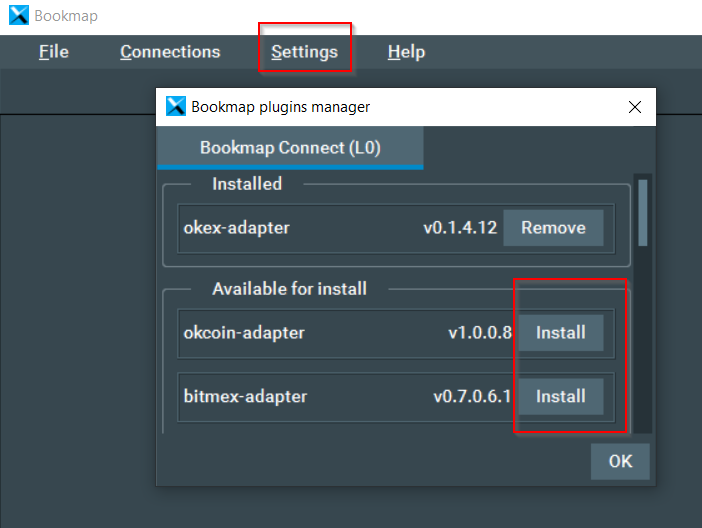
Go to Settings ⟶ Manage plugins and install the adapter.
-
Under Connections ⟶ Configure, add the new connection.
-
To trade, input your API key and secret. (See below for instructions.)
API Keys and Secrets
API keys and secrets are used only to authenticate yourself with the exchange's API servers. They are not shared with any Bookmap's servers.
Supported Crypto Adapters
Bookmap supports adapters for various cryptocurrency exchanges. Some of the supported exchanges include:
-
Binance (Spot)
- Market Data: No credentials required.
- Create an API key & secret pair under Binance API management settings (check Enable Trading to trade).
-
Binance Futures
- Market Data: No credentials required.
- Create an API key & secret pair under Binance API management settings (check Enable Trading and Enable Futures).
-
Bitfinex
- Market Data: No credentials required.
- Create an API key & secret; see instructions here (check all Read check boxes, Orders, and Trading).
-
BitFlyer
- Market Data: No credentials required.
- Trading: Create an API key & secret on the BitFlyer Developer page (check all Assets and Trading permissions).
-
Bitstamp
- Market Data: No credentials required.
- Create an API key & secret on the Bitstamp API keys page (select all General and Orders key permissions).
-
Bittrex
- Market Data: No credentials required.
- Create an API key & secret; see instructions here (toggle on READ INFO and TRADE).
-
Bybit
- Market Data: No credentials required.
- Create an API key & secret; see instructions here.
API Transactionand in theKey Permissionfield chooseActive Order and Positions - Note: If you don't bind any IP addresses to your API key, it will be valid for 3 months. Afterwards, a new API key is required.
-
Deribit
- Market Data: No credentials required.
- Create an API key & secret on the Deribit API keys page. Set the following scopes:
account: read, trade: read_write, wallet: read, others: none.
-
HitBTC
- Market Data: No credentials required.
- Create an API key & secret under HitBTC API keys settings (check Order book, History, Trading balance, and Place/cancel orders to trade).
-
Kraken (Spot)
- Market Data: No credentials required.
- Create an API key & secret; see instructions here (check Query Funds, Access WebSockets API, and all checkboxes under Orders & Trades).
-
Kraken Futures
- Market Data: No credentials required.
- Create an API key & secret; see instructions here (check Query Funds, Access WebSockets API, and all checkboxes under Orders & Trades).
-
KuCoin
- Market Data: API credentials required.
- Create an API key, secret and passphrase; see instructions here.
- Trading: Not supported yet.
- Note: Spot and futures have separate credentials that you must create.
-
OKEx
- Market Data: No credentials required.
- Trading: Not supported yet.
-
Poloniex
- Market Data: No credentials required.
- Create an API key & secret; see instructions here (check Enable Trading).
Please note that most adapters are designated as alpha, and while they have been used for a while, we are still testing them to enhance their functionality and resolve any issues.
Troubleshooting and Feedback
If you encounter any issues with a crypto adapter, report them in the Supported Connections forum section. You can also request new adapters in the Request a connection forum section. For more information on each cryptocurrency exchange-specific adapter, including changelogs and requesting new features, visit the respective Bookmap forum section for that exchange.